
Switch from Gabb.Save up to $100!
Whether your kid is ready for a smartphone or a simpler smartwatch, save money when you switch to Bark.

Bark Phone
A real smartphone with Bark's safety features built in from day one.
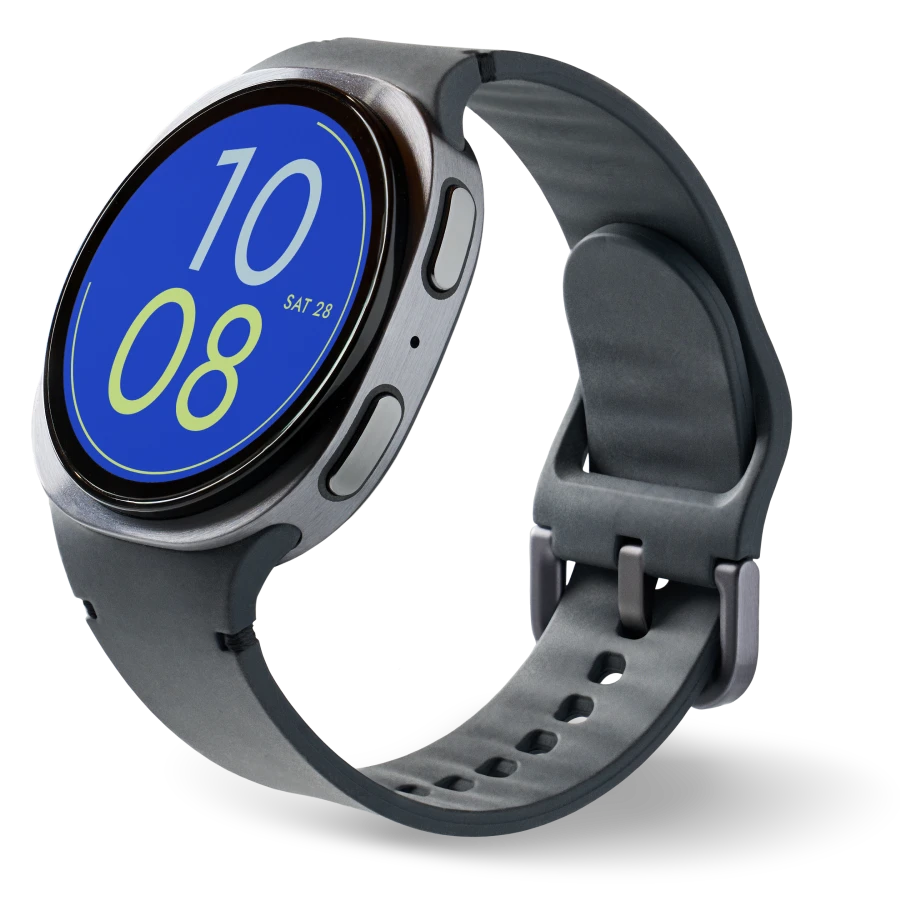
Bark Watch
Simpler connection and parental controls for kids aren't ready for a smartphone yet.
They love it, so will you.
Switching is easy.
Bark Phone FAQs
The Bark Phone is a Samsung A16, while the Bark Phone Pro is a Samsung A36. We chose these models specifically because they look like regular smartphones—not bulky "kid phones."
While there's no Bark branding on the outside of the device, a small Bark icon does appear on the lock screen, notification screen, and status bar since Bark provides the cellular service. Any Bark apps can be moved or hidden in folders. The phone itself looks just like any other Samsung device.
Parents can easily manage their child's Bark Phone from the parent's Android or iOS device.
The Bark Phone and Bark Phone Pro are paid for monthly over 24 months. This monthly cost covers the device only. A Bark wireless plan is required for activating your Bark Phone.
- Bark Phone: $10/month for 24 months (device payment)
- Bark Phone Pro: $25/month for 24 months (device payment)
Want to pay off your device early? Contact us and we'll help you out.
Your wireless plan cost is separate from your device payment and includes:
- A Bark Premium subscription for the entire family
- Built-in parental controls
- Unlimited talk & text
- Mobile data (if you choose a data plan)
Starter plan:
- $29/month for unlimited talk, text, and no internet, app store, or games
Advanced plans:
- $39/month for unlimited talk, text, and Wi-Fi only (no data)
- $49/month for unlimited talk, text, and 4GB data
- $59/month for unlimited talk, text, and 8GB data
- $79/month for unlimited talk, text, and data1
1 After exceeding 35GB/month of data use, data speeds will be reduced for the remainder of the monthly billing cycle. After exceeding 50GB/month of data usage, data speeds may be reduced further and/or data connection may be turned off for the remainder of the monthly billing cycle.
Because Bark’s software is built directly into the phone, it automatically monitors texts, emails, social media, and apps. Bark also can't be deleted from the Bark Phone, which helps ensure the settings you put into this cell phone for kids will stay.
The Bark Phone also offers exclusive features that the app doesn’t, including:
- Contact approvals
- App install approvals
- Remote alarms
- Daily screen time limits
- Completely tamper-proof settings
Every Bark Phone comes with:
- Unlimited talk and text
- Bark Premium subscription for the entire family
- USB-C charging cord
- A data plan that fits your family’s needs (non-starter plans only)
- Quick start guide for easy setup
The Bark Phone Pro has an IP67 rating that makes it water- and dust-resistant, meaning it can handle splashes, spills, and a little dirt.
The Bark Phone Pro has a scratch-resistant screen made with Gorilla Glass, built to provide extra protection for active kids.
If your family already has a Bark Premium subscription, no problem! After your first Bark Phone payment, we'll adjust your plan and add any credits due from your old subscription to your next month's Bark Phone payment.
The Bark Phone Pro comes with all of the same great parental controls (monitoring, blocking, contact approvals, and more) as the Bark Phone but with more memory, a faster processor, and enhanced durability.
- Scratch-resistant screen and extra protection against drops
- Water- and dust-resistant to handle splashes, spills, and dust
- Super-fast octa-core processor for smooth performance
- 6 GB RAM for seamless video calls and gaming
The Bark Phone Pro is ideal for tweens and teens who are more active on their devices and need a little extra power and durability. But any kid will love the Pro!
Right now, the Bark Phone for kids is only available for families located in the U.S.
Tell us what country you'd like to bring the Bark Phone to next.
The Bark Phone offers two app experiences, depending on the level of freedom your child is ready for.
Starter Plan
This is our most locked-down option. It’s designed for younger kids or teens who need close supervision. Your child can call and text approved contacts. That’s it. No internet access. No apps. No games.
Advanced Plans
Advanced plans give parents more flexibility as kids grow. You can choose to:
- Allow app downloads from the Google Play Store
- Require parent approval for each app
- Block the app store entirely
You stay in control, and you can adjust settings at any time as your child’s needs change.
The Bark Phone stands out from other kid phones because of our advanced content monitoring that comes built-in. Our software automatically scans texts, photos, videos, apps & social media for dangers and sends you an alert if something concerning is found.
We also made it completely customizable, because every family — and kid — is different. For younger kids, you can make the Bark Phone work essentially like a non-smartphone with our starter plan, which is talk and text only with no internet access.
As they get older and become ready for more responsibility, you can easily upgrade to our advanced plan and add in access to apps and games. The best part? You keep the same phone!
Yes! The Bark Phone is updated regularly and automatically to keep up with changes in technology and when we add new features — which happens frequently! We’re constantly in touch with actual Bark Phone parents and implement feedback that families would like to see.
If you cancel your Bark Phone subscription more than 60 days after purchase, you'll need to pay off what remains of the total cost of the phone. After that, the phone is yours to keep. The amount you owe depends on when you cancel.
If you’d like to remove Bark’s software and use the phone like a regular Android, our support team can help. Contact us if you have any questions!
This is a common concern for families! With our kid-safe phones, you’ll always be able to keep an eye on your child’s data usage from your Bark parent app/dashboard.
If your child reaches their allotted data limit for the month, you won’t be charged anything. Their experience on the Bark Phone will simply be reduced speeds — this is called “throttling” and is standard practice for phone carriers.
If you’d like to upgrade your child’s data plan, you can add more GB at any time from your account, and it will go into effect quickly.
Rest assured that your account will never automatically upgrade. Your child just may experience slower speeds for streaming and surfing the web. To help reduce data usage, encourage your kid to connect to trusted Wi-Fi networks whenever possible.
Absolutely! When you buy a Bark Phone, you get free access to the Bark app, which you can put on other phones, tablets, computers, and more — perfect for siblings! Adding Bark to every device in your house helps create layers of protection for your family no matter how your children get online.
Nope! You keep the same phone and simply upgrade (or downgrade!) straight from the parent app. Changes will go into effect in just a few minutes.
FCC Hearing Aid Compatibility (HAC) Regulations for Wireless Devices
The FCC established requirements for devices to be compatible with hearing aids and other hearing devices. For more information, visit the FCC website.
The wireless phone devices sold by Bark have been shown to be HAC compatible for GSM, LTE, and UMTS.
HAC for Newer Technologies:
The wireless phone devices sold by Bark have been tested and rated for use with hearing aids for some of the wireless technologies used. However, there may be some newer wireless technologies used in this device that have not been tested yet for use with hearing aids. It is important to try the different features of this device thoroughly and in different locations, using your hearing aid or cochlear implant, to determine if you hear any interfering noise. Consult your service provider or the manufacturer of this device for information on hearing aid compatibility.
You sure can! Bark lets you transfer an existing number from another carrier — known as "porting" — at no additional cost! Check out this help article for step-by-step instructions.
Yes, we offer optional device protection plans with AKKO that cover accidental damage, loss, and more — because life happens. Learn more here.
You can reach out to our customer support team — they’re standing by ready to help!
Yes, users can make video calls on the Bark Phone. The Bark Phone doesn’t have its own built-in video calling app, but users can still access popular services like FaceTime, Zoom, or Google Meet with parental approval. Users can also start or join video calls through Zoom or Google Meet, just like they would on any other Android device.
Yes, users can join a FaceTime video call on a Bark Phone, even though it’s an Android device. If trusted contacts with an iPhone (iOS 15 or newer) create a FaceTime call link, users can open it in the Bark Phone’s browser and participate in the video call.
Bark Watch FAQs
The Bark Watch is a Samsung Galaxy Watch8, a round, sleek smartwatch designed with kids in mind. It runs on Samsung's watch OS and comes loaded with Bark's built-in parental controls, so parents get peace of mind while kids get a little more independence. It's made with Armor Aluminum, is water-resistant, durable, and ready for whatever the day brings.
The Bark Watch stands out from other watches because of our advanced content monitoring that comes built-in. Our software automatically scans texts, photos, and videos for dangers and sends you an alert if something concerning is found.
Every Bark Watch comes with a charging cable and a Bark Premium subscription for all of your family's devices. Device protection is also available as an add-on for $4/month.
The Bark Watch is paid for monthly over 24 months. This monthly cost covers the device only. A Bark service plan is required to activate your Bark Watch.
Device payment:
- $10/month for 24 months. You can pay it off early — just contact us!
Your $15/month service plan is separate from your device payment and includes:
- Cell service and parental controls
- A Bark Premium subscription for the entire family, covering unlimited kids and devices, including phones and tablets you already own
Right now, the Bark Watch for kids is only available for families located in the U.S.
Tell us what country you'd like us to bring the Bark Watch to next.
If your child ever needs help, they can hold the top right button on the Bark Watch to bring up an "Emergency call" option, which lets them quickly call 911.
Nope! The Bark Watch is a standalone device with its own phone number, talk & text, and other features. There's no need to purchase a Bark Phone when you’re buying the Bark Watch.
Yes! The Bark Watch is water-resistant with a 5ATM + IP68 rating, meaning it can handle up to 5 feet of freshwater for up to 30 minutes. It hasn't been tested in salt water, chlorinated pools, or high-pressure situations like diving.
Before swimming or getting the watch wet, turn on Water Lock. This locks the screen so it doesn't respond to water touches. It also turns on automatically when your child starts a Swimming Workout in the Samsung Health app on the watch.
When they're done, turn off Water Lock. The watch will vibrate to push out any leftover water. Rinse off any residue and dry the watch before wearing it again.
The Bark Watch does not have a camera, so your child can't take photos or record video with it. That said, Bark's content monitoring still covers photos and videos that are sent or received on the watch, so you'll get an alert if something concerning comes through.
You sure can! Bark lets you transfer an existing number from another carrier — known as "porting" — at no additional cost! Check out this help article for step-by-step instructions.
Nope! We aim to make things easy with the Bark Watch — your family and friends can text them easily straight from their own phone.
Nope! You can add as many contacts as you'd like to the Bark Watch. And if you choose, your child can reach any contact without needing prior approval — though parents can still require approval if that's what works best for their family.
Data and coverage is provided by Bark.
If you cancel your Bark Watch subscription more than 60 days after purchase, you'll need to pay off what remains of the total cost of the watch. After that, the watch is yours to keep. The amount you owe depends on when you cancel. Your Bark Watch will remain fully functional until the end of your billing period, after which all apps on the Bark Watch will be grayed out.
For more information on returns, including damaged or defective watches, check out our help article.
Yes, we offer optional device protection plans with AKKO that cover accidental damage, loss, and more — because life happens. Learn more here.
You can reach out to our customer support team — they’re standing by ready to help!