
The Best Parental Control Software for Families
Looking for the best parental control software for your family? Here’s all the info you need to help protect your kid.
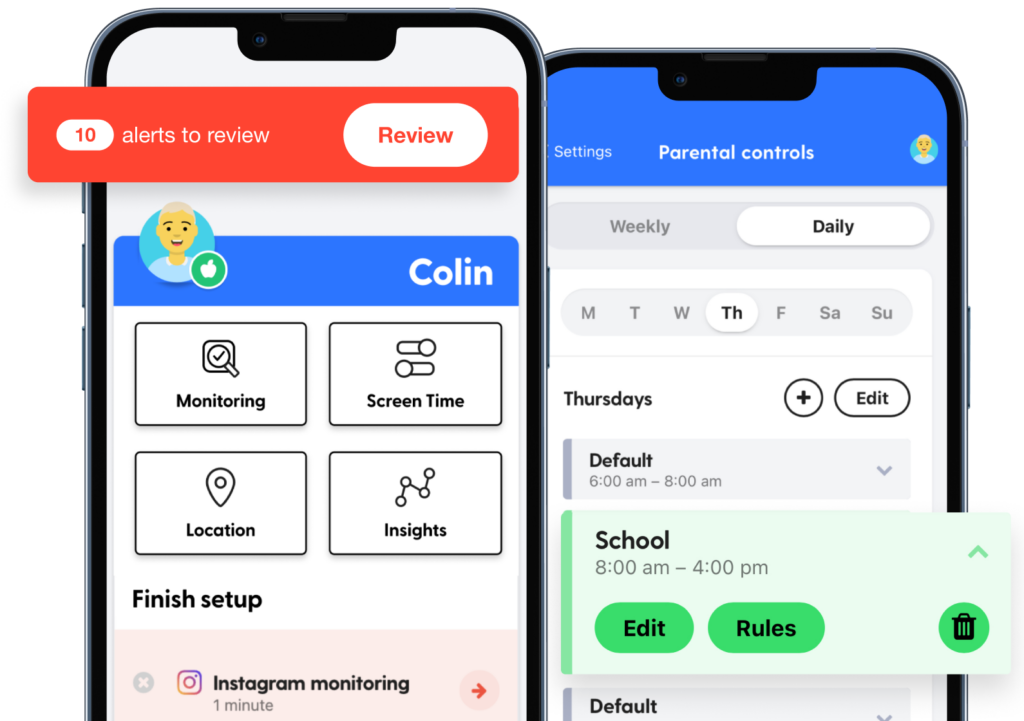

Comprehensive Parental Control Software
Whatever devices, apps, and accounts your kids have, Bark is the best parental control software because of what we can cover! Content monitoring? Check. Screen time controls? Check. Web blocking? Check. 🙌
Compare the Features

Set custom rules for school time, bedtime, and free time
Only allows Downtime
Create one set of app and/or website limits to be applied
Can also set weekly or daily downtime schedule.
Block specific sites and 19 categories, including adult content, gaming, and streaming sites
Block specific sites and can block adult content as a category
Disable the internet whenever needed — no matter where your kids are
Does not have an instant internet pause toggle, however you can manually adjust Screen Time/Downtime settings as needed to restrict internet access
Scans online activities for concerning content
Messages includes tools that warn children and provide helpful resources if they receive or attempt to send photos that may contain nudity. Parents are not notified; children have the option to message an adult that they trust about the photo if they choose to.
Get email/text notifications for issues like cyberbullying and sexual content
Pop-up warning for messages that include nudity
Keep restrictions in place no matter how YouTube is accessed while connected to Bark
Must be manually turned on within the YouTube app and children may make changes to this setting
Prevent children under 18 from opting out of Bark
Any family member age 13 or older can remove themselves from a family group. If you have Screen Time turned on for your account, the family organizer must remove you.
Manage all your family’s devices easily with one app
Only works with iOS devices
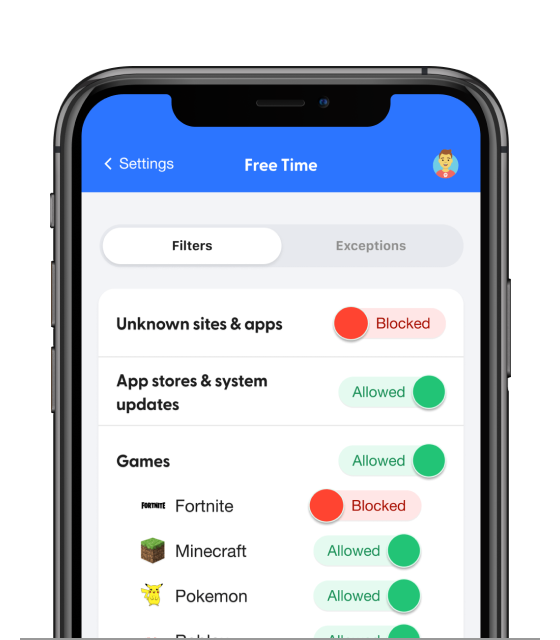
The Best Parental Control Software You Can Find
Ready to restrict access to sexual websites? Really want to learn how to block YouTube? Want to receive alerts if your child is being cyberbullied?
Bark can help with all of that (and so much more), and is the most comprehensive parental control software out there.
What Parents Are Saying
The Best Parental Control Software for Insights
Do you know what “bussin” means? Are you familiar with the surprising way kids use the 🍝 emoji? Can you tell what’s going on with your child all the time?
It can be really tough to know when your kid is struggling, or to even know the surprising meanings of the emoji slang they send their friends.
Bark can show you patterns in your kid’s online activities and alert you if something may be wrong — even if they use Gen Z slang to express it!

FAQs
Once you connect your child's devices and accounts, Bark runs quietly in the background — no daily effort needed. Here's the basic flow:
1. Bark monitors your child's online activity
Bark scans texts, social media, emails, web searches, and saved photos and videos across your child's devices. Rather than flagging every message, it uses advanced AI and natural language processing to understand context — so it knows the difference between a kid venting about homework and a kid who's genuinely struggling.
2. You get an alert when something needs your attention
If Bark detects a potential issue — like signs of bullying, predatory behavior, suicidal ideation, or explicit content — it sends you an alert right away, along with context and guidance on how to address it.
3. You stay in control of the rest
Beyond monitoring, you can manage screen time schedules, block websites and apps by category, and track your child's location with live GPS and check-ins — all from the Bark parent app. For a deeper look, visit our How Bark Works page.
Absolutely! Whether your child has an Android or an iOS device, it’s possible for co-parents to share alerts and notifications. Read more about it sharing alerts and notifications here or contact us to learn more.
Bark's parental controls for iOS devices give you the power to monitor your child’s online activities in a groundbreaking way.
Our content monitoring uses advanced AI to scan messages, posts, comments, replies, web searches, and so much more to find potential dangers. If something concerning is found, you’ll get a timely alert so you can check in and make sure everything is okay. Learn more about what Bark monitors on iOS devices here.
In addition to monitoring, Bark also lets you manage screen time, block websites & apps, and track location 24/7.
These key features of our iPhone parental monitoring app work together to build a powerful digital safety net to help you protect your child online and in real life.
We believe Bark provides the most Android coverage of any parental control tool! It’s also a great alternative to Google Family Link because it lets parents get more granular with screen time limits and blocking.
If your kid has an Android, Bark lets you:
- Monitor texts and saved photos & videos
- Monitor 30+ social media platforms and apps
- Manage screen time
- Block websites and apps
- Track location in real time
The easiest way to get started is to visit our sign-up page or download the Bark parent app (iOS, Android) — from there, you'll be guided through setup step by step.
Not sure which product is right for your family? Learn more about the Bark App, Bark Phone, Bark Watch, Bark Sync, and Bark Home.
Ready to Get Started?
Now that you know how Bark’s parental control software works, take the next step! Bark was created by parents, for parents, to offer a more effective way to help families create healthy digital habits.
